You've had this conversation.
You open a new session, start describing what you're building, and realize you're re-explaining something you told it last week. The naming conventions. The architectural decision you made in month two. The reason you're not using that library. The agent picks it up quickly — and then forgets all of it the moment the session ends.
This isn't a bug in the AI. It's a gap in your infrastructure.
A team of researchers documented what they built to solve this across 283 development sessions — over 2,800 prompts, over 1,100 agent invocations, one large production codebase. The system they built is called codified context, and the core insight is straightforward: your project knowledge shouldn't live in your head. It should live in structured documents that agents load automatically, the same way a new developer would read the docs before touching anything.
OpenAI's Codex team ran a harder version of the same experiment: zero manually-written code, five months, three engineers, a million lines of production software. Estimated at 1/10th the time it would have taken by hand. The lessons from both converge on the same architecture.
The Architecture
Three tiers. Each serves a different purpose and gets loaded differently.
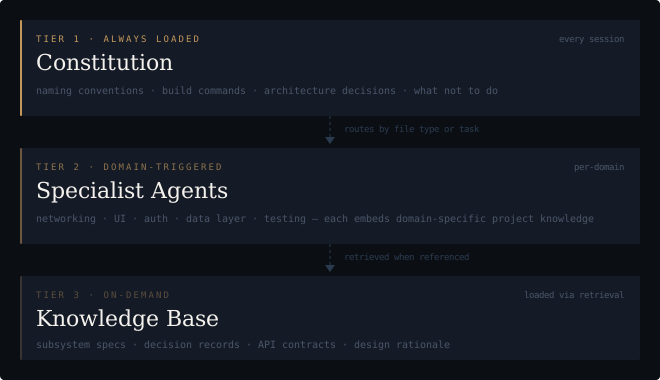
(The bars dim from tier to tier — intentionally. Visual weight maps to frequency: Tier 1 is always in context, Tier 2 loads per-domain, Tier 3 only when retrieved.)
Tier 1 is your constitution — always loaded, every session. Think of it as the first thing any agent reads before it touches anything in your project. The researchers landed at around 660 lines for their production codebase. Start smaller and let it grow.
What belongs in it:
- Project name and objective (one sentence — what is this and what problem does it solve)
- Top-level directory structure and what lives where
- Naming conventions (files, functions, variables, components)
- The tech stack and the decisions already made (and why — this is the part most people skip)
- What not to do — the anti-patterns you've already burned yourself on
- Build, test, and deploy commands
- The most common task types the agent will handle
If you're using Claude Code, this is your CLAUDE.md. If you're using Cursor or another tool with persistent context, it's whatever that tool calls its rules file. The format doesn't matter. The habit does.
The mistake almost everyone makes first: putting everything in this one file. OpenAI's team tried it — one large AGENTS.md as the single source of truth. It failed in four predictable ways. Context is scarce, so a giant instruction file crowds out the task itself. When everything is marked "important," nothing is. The file rots instantly — a monolithic manual becomes a graveyard of stale rules the agent can't distinguish from current ones. And it's impossible to verify mechanically: you can't lint a blob for freshness or cross-link coverage.
Their fix: treat the top-level file as a table of contents, not an encyclopedia. Around 100 lines. Pointers to deeper sources of truth in a structured docs/ directory. The entry point stays small and stable; the depth lives where it can be maintained, versioned, and verified.
Tier 2 is specialist agents — loaded when the agent hits relevant territory. A networking specialist handles /api/ files. A UI specialist handles components. A testing specialist runs when you're writing tests. Each carries not just behavioral instructions but project-specific domain knowledge — what your API conventions actually are, which component patterns you're using, how your test suite is structured.
The key finding from the research: more than half the content in these specs should be project-domain knowledge, not generic instructions. Generic instructions produce generic results. Specificity is what makes this work.
Tier 3 is the knowledge base — everything else, loaded on demand. Detailed subsystem specs, decision records, API contracts, design rationale. You don't load 15,000 lines at session start. You retrieve what the current task needs.
Most projects don't need Tier 3 on day one. Start with the constitution. Add specialists when you can see the fault lines forming.
What Lives Outside the Repo Doesn't Exist
From the agent's point of view, anything it can't access in-context while running effectively doesn't exist. That Slack thread where your team aligned on the authentication approach? If it isn't in the repository, it's as invisible to the agent as it would be to a new hire who joined last week. The architecture decision made in a meeting? Same.
Knowledge that lives in Google Docs, chat threads, or people's heads is not accessible to the system. Repository-local, versioned artifacts — code, markdown, schemas, execution plans — are all it can see.
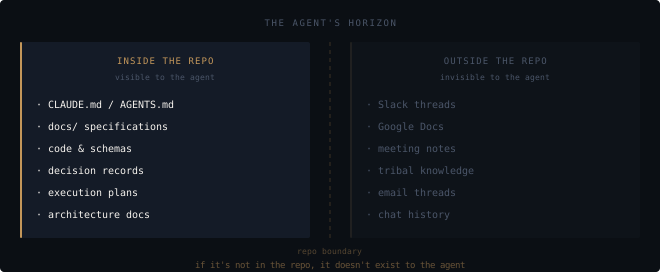
This is why pushing context into the repo compounds over time. Every decision you document there becomes permanent leverage. Every decision that stays in Slack becomes invisible noise.
The implication is also a useful test: if you wouldn't be comfortable onboarding a new engineer from only the repository, the agent is flying blind on the same gaps.
The Failure Mode
Specifications go stale.
An agent trusts documentation absolutely. If your spec says the project uses pattern X and you refactored to pattern Y three weeks ago, the agent will confidently generate code using pattern X. Every session. The output looks reasonable. The problem hides until it doesn't.
The fix is treating specs as living artifacts — updated alongside code changes, not as a separate documentation project that follows later and never quite catches up. The researchers averaged 1–2 hours per week on maintenance across a team. A real cost, but far smaller than the alternative.
The key diagnostic: when your agent seems confused, asks questions it should know the answers to, or keeps reproducing a mistake you've corrected before — stop prompting and start writing. That confusion is a signal.
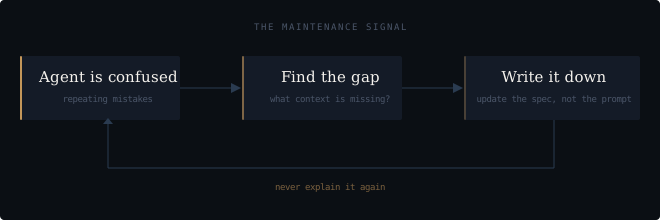
The rule that makes this work in practice: write it down the first time you explain it. Not later. The moment you find yourself typing an explanation into a chat window, that explanation belongs in your spec. Copy it. Clean it up. Add it. The next session starts smarter.
Golden Principles and Entropy
There's a harder version of the maintenance problem that only appears at scale, but it's worth understanding early: agents replicate patterns that already exist in the repository — including the bad ones.
OpenAI's team discovered this the hard way. They were spending every Friday — 20% of the working week — manually cleaning up what they called "AI slop." Suboptimal patterns that crept in would get replicated across new code until someone caught them. The cleanup was reactive, manual, and expensive. It didn't scale.
Their solution was encoding what they call golden principles directly into the repository: opinionated, mechanical rules that define what good looks like. Not just documented — enforced. Custom linters that validate naming conventions and file structure. CI jobs that check the knowledge base for freshness and cross-links. A recurring cleanup task that scans for deviations and opens targeted refactoring PRs. Most can be reviewed and merged in under a minute.
The framing that stuck: technical debt is a high-interest loan. Continuous small repayments are almost always cheaper than periodic painful bursts. Human taste, captured once, enforced continuously on every future line of code.
The upgrade from "updated spec" to "enforced rule" matters because rules apply automatically. And when a linter catches a violation, the error message itself can inject the remediation into agent context — so the agent learns the correct pattern inline, without you explaining it again.
Getting Started and Getting Better
This is a ramp. At AI build pace, the whole ramp fits in a week.
Hour 1 — write the constitution.
Before your first session, not after. Open a file (CLAUDE.md, AGENTS.md, .context/project.md — pick a convention and commit to it). Write down:
- What the project is and does (one paragraph)
- The directory structure with one-line descriptions
- Naming conventions — be specific, include examples
- The three most important architectural decisions and why you made them
- Three things the agent should never do in this codebase
Don't try to make it comprehensive. The sessions will make it comprehensive.
End of day 1 — run the blind test.
You've already had multiple sessions by now. Look at what the agent got wrong, what it asked you to clarify, what you had to correct. Every one is a gap in the constitution. Fill them before starting tomorrow. At AI build pace, bad patterns replicate in hours, not weeks — don't let them compound overnight.
Day 2 — add one specialist.
You already know where the work is concentrated — yesterday showed you. Pick that domain. Write enough context to cover it properly: what patterns you use, what libraries you've standardized on, what the typical task looks like, what the common mistakes are. Depth here is the point — generic instructions produce generic results.
Day 3 — write your first golden principle.
By now you've corrected the same thing twice. That's the threshold — if you've explained it twice, encode it once. Write a named rule: the anti-pattern, an example of the violation, and the correct form. Add it to the constitution's "what not to do" section. This is the beginning of encoding taste, not just documenting it.
End of week 1 — make one rule mechanical.
Take your most-violated golden principle and ask: can this be checked automatically? A linter rule. A structural test. A CI job. Write the error message to teach, not just to fail — the message itself should inject the fix into agent context. Once a rule is mechanical, you never explain that mistake again.
Weekly — doc-gardening.
At AI build pace, your codebase changes faster than any human documentation cycle can track. Weekly, not monthly. Open your constitution and specialist specs, check whether the actual codebase still matches what's written. If you're running agents hard enough, prompt one to run the audit — scan actual patterns against documented rules, flag what's stale. The system can maintain itself.
The progression is: document → enforce → automate. Most people stop at the first step. The compounding happens in the other two.
The agent isn't the bottleneck. The missing infrastructure is.
Build the memory once. Then build the rules. Then let them work.